Model Slots
Tanuki includes multiple slots that hold Machine Learning models that perform inference steps in workflows. Which models you use depend on what you want from your workflows. From your usecase to the hardware you run, there are several things to take into account.
Language models are basically mathematical representations of the relationships between the words in a giant corpus of knowledge.
Given a sequence of words, the model uses those statistical relationships to ‘derive’ the most likely next one.
I’ll pause here…and remind you I can’t hear you yelling.
Yes, that’s a VERY simplistic description, but for all intents and purposes, it’s correct, certainly good enough.
These models don’t handle language the way we do. They work in tokens; chunks of text, often parts of words rather than whole ones. To read a document, the model explodes its tokens into big grids of numbers and holds them in memory while it works. Those grids balloon fast: a 100 KB file can turn into hundreds of MB of working memory, many times the original. And that’s on top of the model’s own size, which is measured in gigabytes. Both have to fit on your machine, which is why what you’re running on matters.
While we discuss models, lets look at the Model Config page, this is where you can assign different models to different slots, and then configure their base settings.
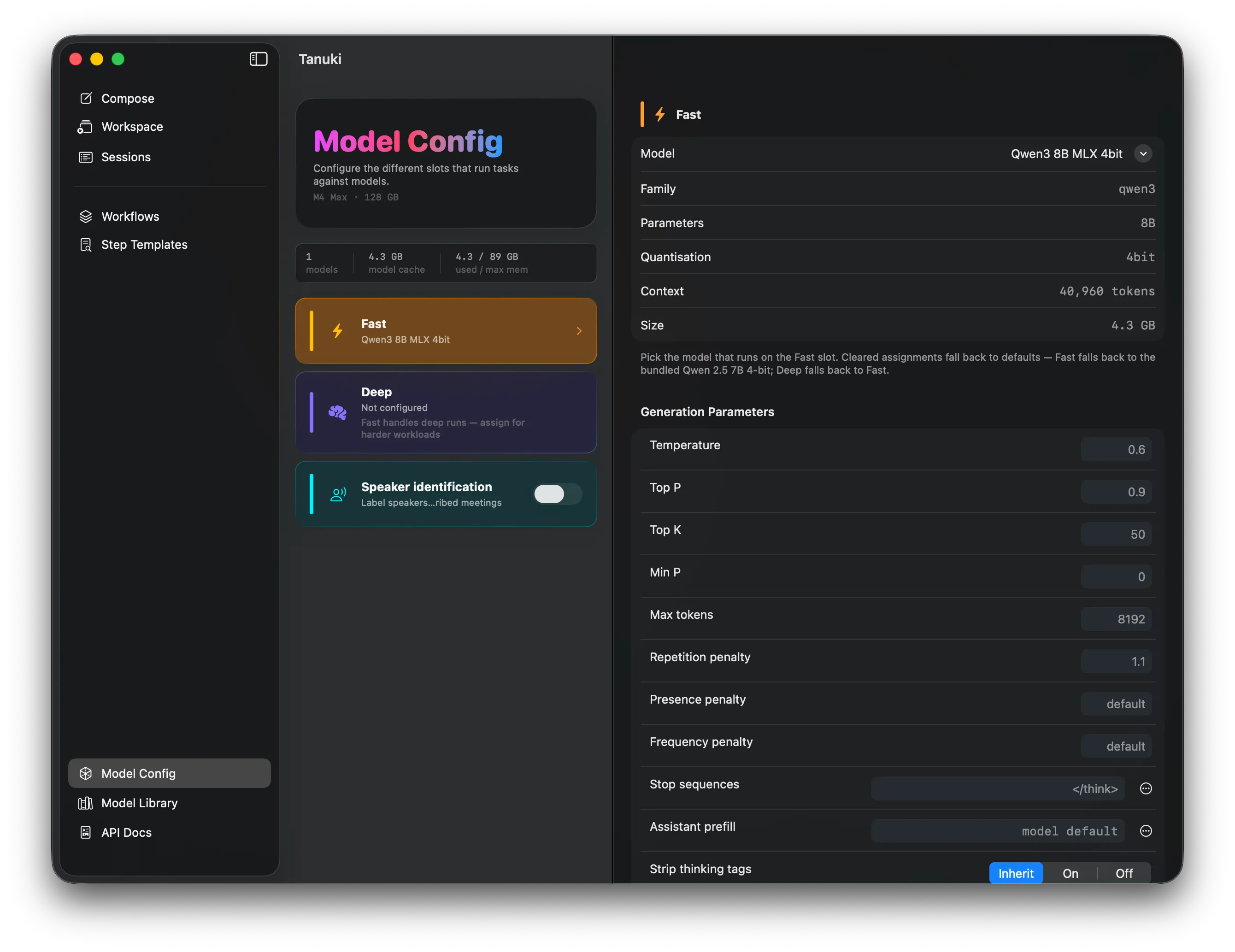
In the image above, you can see the Model Config page includes a column of ‘slots’, these represent the places that load models that can be called by our workflows.
Tanuki presently has 3 configurable slots, the first two manage language models and the third pulls down a speech only tool that is used by speech diarisation steps.
Fast Slot
Section titled “Fast Slot”The fast slot is always populated with a language model. When you complete the initial onboarding and select a local cache, Tanuki pulls a model and assigns it to that slot.
While there is only one model present, all language model targeting workflow steps (presently .fast or .deep), are routed to the fast slot. Once a model is added to the deep slot, .deep workflow steps will be forwarded there.
The fast slot will contain a Qwen3 8 Billion Parameter, 4bit Quantized Model developed by Alibaba. Both the download and the active memory footprint of the model are approximately 4.3Gb.
This is a reasonably small model that runs quickly on a variety of hardware profiles. Some older M series macs with small memory capacities may want to experiment with 3-4 Billion parameter models.
4bit quantization models, recommeneded for most of the standard usecases for Tanuki, quantization is a way of compressing the size of a model, it works by reducing the precision of the numbers in the token relationship matrix.
This exchanges a significant performance increase for a small reduction in the reasoning ability of the model.
But heres the thing with that. For most of our cases, we don’t want that extra reasoning. Tanuki isn’t going to do your homework. It organises voice recordings down to usable text, or summarises documents or other text. We don’t need it to be thoughtful, or creative. Its duty is to fix language mistakes first and foremost and then structure text.
Deep Slot
Section titled “Deep Slot”Some tasks that Tanuki can help you with might require some more complex, deeper reasoning. Cases like analysing text logs, or transcribing a board meeting recording. In the meeting case, a recording may be diarised and transcribed through the audio engine then processed by the deep model.
The deep model will do a better job classifying topics, over the larger record, where smaller models will forget details around the edges of the input stream.
What model you use in your deep slot is largely based on the shared memory available.
Practical Slot Details
Section titled “Practical Slot Details”Machine learning is a resource intensive technology. So it might not sound like a good idea to run multiple models.
The truth is that you cannot actually run multiple models, today on Apple Silicon using MLX, only one language model can run at a time.
But the architecture of the shared memory system on these amazing M series chips means you can have as many models as you can fit in your shared memory idle and ready to process, with almost no start up lag.
We dont need to warm the model, each of the models once lauched is ready to be passed the input context stream to then go ahead and start processing.
Unlike other GPU processing models the M series models draw 0 Watts of power at idle. So you only start using energy while populating and processing the cache.
This unique property makes Tanuki on a single Mac Mini or iMac could drive simple inference on a local network all day.